Why isn't Loading.tsx working in Next.js at times?
Prefetch and Streaming
There is a misunderstanding regarding prefetching and streaming. For prefetching, the Next.js browser sends a request to the Next.js server. When loading.tsx occurs, the streaming is done.
that's all, not more not less according below.
https://nextjs.org/docs/app/building-your-application/routing/linking-and-navigating#2-prefetching
The 's default prefetching behavior (i.e. when the prefetch prop is left unspecified or set to null) is different depending on your usage of loading.js. Only the shared layout, down the rendered "tree" of components until the first loading.js file, is prefetched and cached for 30s. This reduces the cost of fetching an entire dynamic route, and it means you can show an instant loading state for better visual feedback to users.
https://nextjs.org/docs/app/api-reference/components/link#prefetch
Prefetching happens when a component enters the user's viewport (initially or through scroll). Next.js prefetches and loads the linked route (denoted by the href) and its data in the background to improve the performance of client-side navigations. If the prefetched data has expired by the time the user hovers over a , Next.js will attempt to prefetch it again. Prefetching is only enabled in production.
The following values can be passed to the prefetch prop:
- null (default): Prefetch behavior depends on whether the route is static or dynamic. For static routes, the full route will be prefetched (including all its data). For dynamic routes, the partial route down to the nearest segment with a loading.js boundary will be prefetched.
- true: The full route will be prefetched for both static and dynamic routes.
- false: Prefetching will never happen both on entering the viewport and on hover.
When it comes to streaming without prefetching, Next.js browser sends a request to the server and receives streaming resources in return. However, for the first part of the resource payload, loading.tsx or suspense jsx is included first.
The yellow section represents a HEAD method request that verifies HTTP validity by obtaining metadata used for the GET request.
In the green section, loading.tsx is included in the streaming pipeline and used by Next.js to render spinner or skeleton before any other requests are processed.
Even if a request is still being sent or waiting for a response, it will definitely consume the streaming result.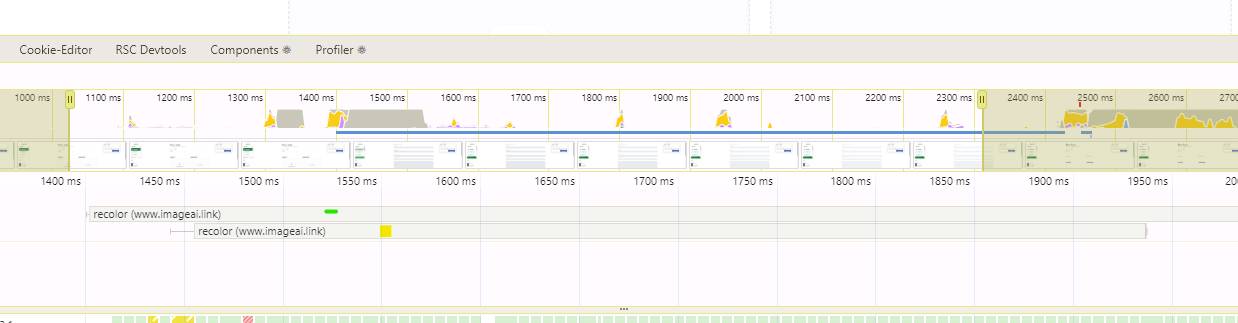
Why loading not working
There may be cases where the loading.tsx file does not work, even though it is defined in the shared layout. If the green loading.tsx file is missing (as shown in the image below), dynamic routes will not stream properly.
For example, if a user navigates from transformations/add/recolor to transformations/add/remove , there will be no streaming due to the missing loading.tsx file in the nearest folder.
However, we do have a loading.tsx file at the shared layout level. Why isn't it working? All other routes are working for the root loading.tsx file.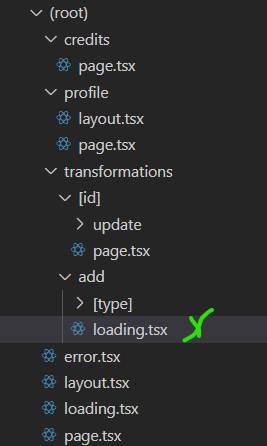
The reason for this is that Next.js wraps many components on our page before rendering it. By using React Dev Tools, we can identify the root cause of this issue. There are some instances where TemplateContext.Provider has the same key, causing React to not unmount and remount the component again. If we don't place suspense inside the add folder, which won't unmount as users navigate from one route to another (e.g., transformations/add/recolor to transformations/add/remove ), loading.tsx (suspense) will not display.
It's also worth noting that if you define loading.tsx in the transformation folder, it will be wrapped into a TemplateContext.Provider with a key of "add" , Therefore, if you define loading.tsx in the root directory and navigate to a page under the profile folder, suspense will wrap around the profile folder instead. This ensures that loading.tsx displays when navigating to other routes while in the root segment.
One more case
If you create two additional folders within the 'credits' folder and navigate between them, the stream (loading.tsx) disappears for the same reason as mentioned above.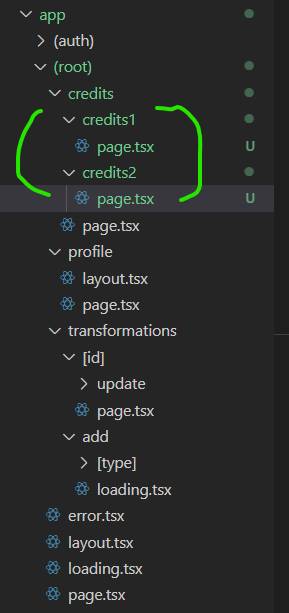
Here's an image that explains why the provider with credits key remains mounted when navigating at the same level. this is because of the react mechanism, same key will not be unmounted.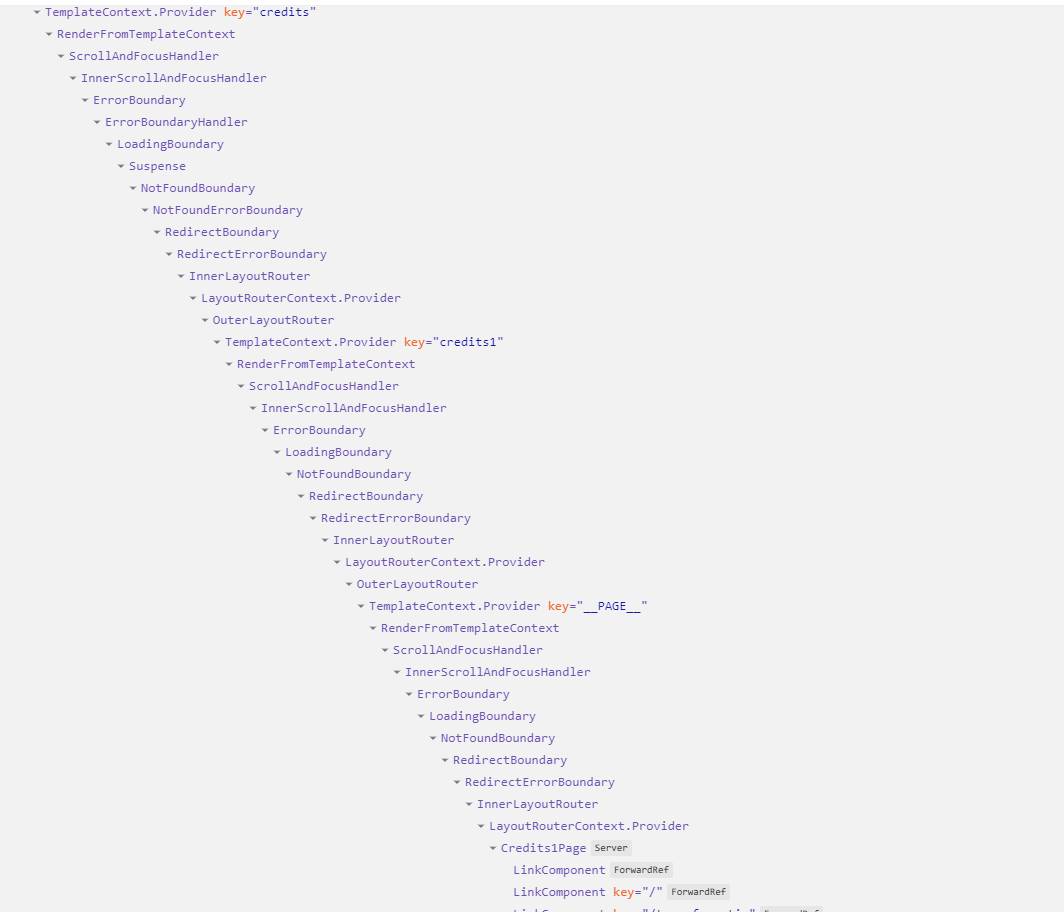
Handing with meta data
There is one more issue that will cause your app to run less smoothly and feel sluggish and cluttered. The generateMetadata function generates metadata for the page before it is sent to the user's browser. Nextjs will wait for generateMetadata to complete, even though it is an asynchronous function, because it serves a SEO purpose.
At this point, the request is sent to the server and hits the first suspense regardless of whether it's in loading.tsx or your component wrapped in suspend. NextJS will return it first using streaming. However, if you have generateMetadata, it will need to wait until it's completed which can cause delays to clicking.
The nextjs will want to fix it with planning on making metadata streamable, which means that we would not block on it during render, allowing you to serve the response asap, but for nextjs version 15.0.3, the issue still here.
Solution for Meta Data
so I would like introduce a workaround solution here:
export async function generateMetadata({
  params,
}: {
  params: { slug: string };
}): Promise<Metadata | undefined> {
  if (!isSSR()) {
    return undefined;
  }
  return constructSuspenseMetadata(params);
}

async function page(){
  return (
    <>
      <Suspense fallback={<ItemGridSkeleton />}>
        <SuspnseComponent {...props} />
      </Suspense>
    </>
  );
}

async functon SuspnseComponent(){
 let metadata: Metadata | undefined;
  if (!isSSR()) {
    metadata = await constructSuspenseMetadata(params);
  }
return {!isSSR() && <title>{typeof metadata?.title === 'string' ? metadata?.title : undefined}</title>}
}
Using this method, React/Next.js streams the page to the browser first. Then, the reminder part will be sent to the browser a few seconds later.
Thanks for reading!